 OyaCloud
Continuous Test Intelligence for Engineering Teams.
One command connects OyaCloud to your existing CI pipeline — no migration, no new framework required.
Automatically compare every test run with the right baseline across builds, branches, and environments. Spot new failures, identify flaky tests, and investigate issues faster with AI.
30-day free trial · No credit card required
Works with your stackOne CLI command from any CI
- Playwright
- Cypress
- JUnit
- TestNG
- pytest
- GitHub Actions
- GitLab CI
- Jenkins
- CircleCI
- Azure DevOps
How it works
Your existing tests. Smarter insights.Four simple steps.
Keep your existing test frameworks and CI pipelines. No test code changes, no agents, no migration, and no infrastructure to manage. Just add one upload step and let OyaCloud do the analysis.
Create your account
Start your 30-day free trial and get your API key instantly.
No credit card required
Install the CLI
One command. Works on your laptop or CI runner.
npm install -g oyacloudUpload your test results
Add one step to CI after your tests. OyaCloud detects branch, PR and build type for you.
oyacloud upload--framework playwright_ts--environment staging--results-dir test-resultsKnow what changed. Not just what failed.
Stop manually comparing test reports. OyaCloud automatically matches every run with the right baseline, highlighting new failures, existing issues and fixed tests, so you can quickly understand what changed.
Did this change break anything?
Compared with the latest post-merge run on the target branch, to find newly introduced failures.
Did the merge introduce problems?
Compared with the previous post-merge run on the same branch, to spot regressions after merging.
Is quality improving or declining?
Compared with the previous regression run in the same environment, to track new failures and improvements.
On every failing test
Flaky or really broken?
Tests that flip between pass and fail are flagged, with their flip rate.
Sorted by cause
AI puts each failure in a category and explains what went wrong.
Its history, one click away
The last 10 runs, each labelled by environment and run type.
Explore the platform
See OyaCloud in action.
From understanding what changed in every build to uncovering failure patterns and tracking quality across environments, OyaCloud brings everything together in one place.
01Intelligent Build Analysis
Every build tells you what changed — not just whether it passed or failed.
Know instantly whether a build introduced a problem.
- Every build compared with the right earlier run, automatically
- New failures kept apart from failures that were already there
- A verdict on every row: NEW FAILURES DETECTED, NO NEW FAILURES, Minor decline, Stable
- Drill down from the verdict to each environment, suite and test
02PR, Post-Merge & RegressionKey differentiator
Know what your PR broke before it becomes tomorrow's production problem.
Each kind of run answers its own question, against its own baseline.
- Pull request — did this change break anything? Compared with the latest post-merge on its target branch.
- Post-merge — is the branch still healthy? Compared with the previous post-merge on the same branch and environment.
- Regression — what changed since the last run? Compared with the previous regression in the same environment.
- New, fixed and still-failing tests, each called out on its own

03AI-Powered Test Analysis
Less time reading logs. More time fixing the right problems.
An investigation accelerator, not a chatbot.
- A plain-language summary of the run and how it compares with its baseline
- Failures sorted into categories: timeout, assertion, network, environment and more
- What went wrong and a suggested fix, beside each failing test
- A priority line that says what to look at first
04Test Trends & Quality Insights
Move beyond individual runs. Understand the direction of your quality.
See how each suite is evolving over time.
- Pass rate across recent runs, with current, best and worst
- Execution time trend, so a suite that is quietly getting slower gets noticed
- The passed, flaky and failed mix over time
- Each suite and environment charted on its own, never blended
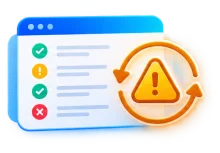
05Flaky Tests & Test History
Stop wasting engineering time chasing the same flaky tests.
Separate unreliable tests from genuine regressions.
- Tests that flip between pass and fail are flagged FLAKY, with their flip rate
- The last 10 runs of any failing test, each labelled by environment and run type
- Broken everywhere, or only in staging? The cross-environment view says
- New, persistent or intermittent, visible at a glance
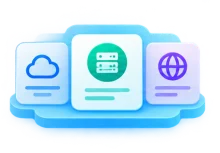
06Environment Intelligence Hub
One place to understand what is happening across your environments.
Health for every environment, and all the detail behind it.
- Every environment’s pass rate and daily health, side by side
- Drill into one: PR, post-merge and regression health at a glance
- Charts for pass rate, tests run vs failures, flaky trend and PR health by week
- Search any test in an environment and see its recent runs
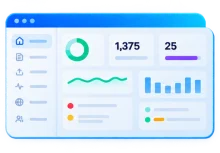
07Unified Quality Dashboard
Your entire testing landscape. One dashboard. No report hunting.
See the full picture without opening a single report.
- Pass rate, tests run and builds across every project for the last 7 days
- Failing runs, and suites whose pass rate keeps falling
- PRs with new failures and the worst runs of the week
- One click from any row to the run behind it
Built for your entire team
Less busywork. More time for what matters.
From investigating failures to tracking quality, OyaCloud gives everyone the answers they need, without the manual digging.
Developers
Know if your change broke anything.
Spend less time investigating CI failures and more time shipping code.
Spot new failures
See what is new versus what was already failing.
Recognise flaky tests
Separate intermittent failures from new issues.
Understand failures faster
AI explanations and a suggested fix beside each error.
Pricing
Simple, transparent pricing.
Every plan starts with a 30-day free trial. No credit card required. Plans are sized by test results a month. Every analytics feature is in every plan; Enterprise adds account options like SSO.
STARTER
$49/mo
- All analytics features, no add-ons
- PR verdicts: new failures vs already broken
- Post-merge and nightly regression tracking
- Flaky test detection
- AI-suggested cause and fix for failing tests
- Dashboard and Environments hub
- Email support
TEAM
$99/mo
- Everything in Starter
- 3× the test results of Starter
- Priority email support
GROWTH
$199/mo
- Everything in Team
- 2× the test results of Team
- Fastest support response
Over 150,000 test results a month, or need longer retention? Talk to us about Enterprise · Find your plan
Security
Your code stays yours.
OyaCloud never needs access to your repository. It receives the test reports your CI already produces — which can include error messages and stack traces from your tests, and that is what it analyses. Keep secrets and personal data out of them — here’s how.
No repository access
No source checkout, no Git provider connection, no app to install.
Only your test reports
The CLI uploads the report files from the results folder you point it at.
Basic build details
Branch, commit, PR number and author, so each run is compared with the right one.
A key per project
Uploads authenticate with a project API key and go straight to storage.
Data is stored on AWS in the United States, and AI analysis runs on AWS Bedrock in the same infrastructure.
FAQ
Questions, answered.
Everything you need to know before your first upload. Still have a question? Get in touch or read the docs.
Playwright (TypeScript/JavaScript and Python), Cypress, TestNG, JUnit and pytest. Cypress needs mocha-junit-reporter added so it writes results the CLI can read. The docs show the exact setup for each.
Any system that can run a Node command. On GitHub Actions, GitLab CI and Azure DevOps the branch, PR and build type (pull request, merge or scheduled run) are all detected automatically. On Jenkins Multibranch, CircleCI and Bitbucket Pipelines the branch and PR are detected, and you add --build-type to merge and nightly jobs. Anywhere else you pass them as flags, such as --branch and --pr-number.
No. Your tests and reporters stay as they are. You point the CLI at the results folder they already write.
The latest post-merge run on the branch the PR targets, for the same framework and suite. That is why the verdict can separate what a PR introduced from what was already failing on main. It prefers a run from the same environment; if there is none, it uses the latest one from another environment and the results page names which. If the target branch has no post-merge run yet, there is nothing to compare against: the results page says "No baseline yet", and every failure in the PR counts as new until that branch has one.
A test is flaky when it flips between pass and fail. A test that fails every time is broken, not flaky. By default a test needs 10 runs of evidence and a 30% flip rate across its last 50 runs, and you can change all three per project.
The trial lasts 30 days, includes every analytics feature with 2 projects, 5 team members and 10,000 test results, and needs no card, so nothing is charged automatically. When it ends, new uploads pause until you choose a plan, and you can still see all the data you uploaded.
No. OyaCloud never connects to your repository: no source checkout and no app to install. The CLI uploads the report files from your results folder and basic build details (branch, commit, PR number, author). Reports can include error messages and stack traces from your tests, and that is what OyaCloud analyses.
On AWS in the United States. AI analysis runs on AWS Bedrock inside the same infrastructure.
Yes. Starter includes 5 team members, Team includes 15 and Growth includes 30. Everyone sees the same projects and results.
Turn your test runs into answers.
One command after your tests. A verdict on every PR, merge and nightly run.
30-day free trial · No credit card